1
Run the workflow locally
ghdebug run starts your job in a container, with the same steps as GitHub Actions.
When a step fails, the job pauses and you get a shell inside the container — same files, same environment. Fix it, retry the step, and keep going. No more commit, push, wait, repeat.
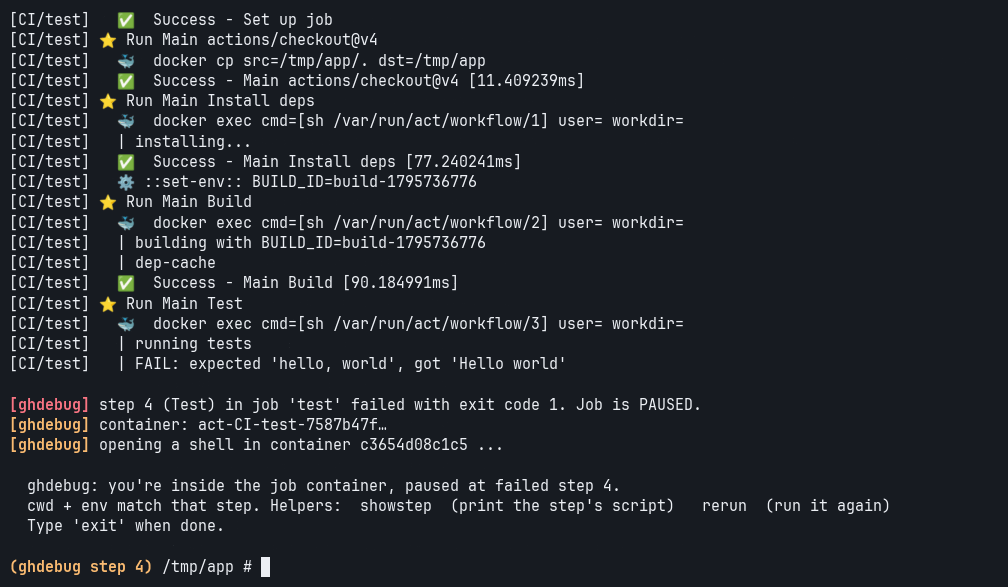
ghdebug is a small wrapper around nektos/act. act runs your workflow in Docker. ghdebug adds the debugging loop.
1
ghdebug run starts your job in a container, with the same steps as GitHub Actions.
2
When a run: step fails, the job stays up. You land in a shell at that step, with its working directory and environment still intact.
3
Edit the files, type rerun, then retry the step. Or fix the code on your machine and continue from step N.
$ pipx install git+https://github.com/oiwdis/ghdebug.git
$ cd your-repo
$ ghdebug run

[ghdebug] step 4 (Test) failed with exit code 1. Job is PAUSED.
(ghdebug step 4) $ echo $BUILD_ID
build-1795736776
(ghdebug step 4) $ exit
[ghdebug] resume how?  [r]etry  [c]ontinue  [f]ail > r
[ghdebug] workflow succeeded

$ ghdebug run --from-step 4This is a working prototype. It is useful today, and some cases still fall through.
Docker (running), act 0.2.60 or later, and Python 3.9+. The first run pulls a runner image, about 1.6 GB for ubuntu-latest.
Only run: steps pause in place. If a uses: action fails, the job ends as usual. The container is kept, so you can still inspect it with ghdebug shell -j <job>.
--from-step replay everything the earlier steps did?It reuses the container from the last run, so files those steps wrote are still there, and it restores environment variables they exported through $GITHUB_ENV and $GITHUB_PATH. It cannot restore step outputs (steps.x.outputs) or caches and artifacts from the skipped steps. actions/checkout still runs, so your edited code is copied in.
No. It is for debugging locally. act is very close to GitHub, but some actions, services, and runner images still behave differently. A green local run is a strong signal, not a guarantee.
It has been tested end-to-end on Linux. It should work on macOS with Docker Desktop, Colima, or OrbStack. On Windows, use WSL2. A first-party macOS pass is still on the list.
Yes. The CLI is open source under the MIT license. The source is on GitHub.
The CLI is available now. Leave your email if you want to hear about releases and the next features. Optional: tell us the CI pain you want this to kill.
You’re on the list. We’ll email you about releases.